Elevating Workflows: 11 Essential Command-Line Utilities

By Brian Zalewski on

The command-line interface is a powerhouse for software developers and system administrators, offering tools that streamline operations, boost efficiency, and simplify complex tasks. This guide focuses on a select group of command-line utilities that are indispensable for GitHub power users. This list is all-encompassing by no means but, rather, a list of some of my top picks. Embracing these tools can significantly enhance your operational capabilities and enjoyment in daily tasks.
1. Enhanced Code Viewing with
bat
Supercharged cat Alternative:
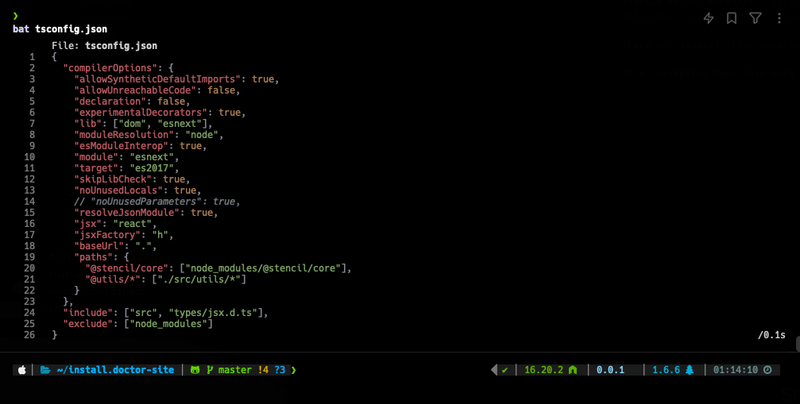
bat reinvents the cat command with syntax highlighting and line numbering, transforming code review into a visually engaging and efficient process. It can be used to seamlessly replace
cat when enhanced readability and functionality are desired. In fact, it can be used as a drop-in replacement for
cat when line-numbering and paging are disabled (as long as coloring does not mess with your scripts).
2. Dotfile Management Simplified with chezmoi
Robust Configuration Keeper: Chezmoi offers a streamlined solution for managing dotfiles. It powers the configuration management and templating of the Install Doctor provisioning system, providing a reliable and mature platform for organizing and version-controlling system configurations, backed by an active and responsive development community.
3. Docker Optimization with
dockerslim
Slimmer Containers, Safer Deployment:
dockerslim meticulously analyzes and optimizes Docker images, significantly reducing their size while adhering to security best practices. This tool is essential for anyone looking to minimize resource usage and enhance container security. It can sometimes reduce Docker container sizes by up to
90%.
4. Streamlining Development with Automated Commit Generators
Effortless Commit Messages: Tools like
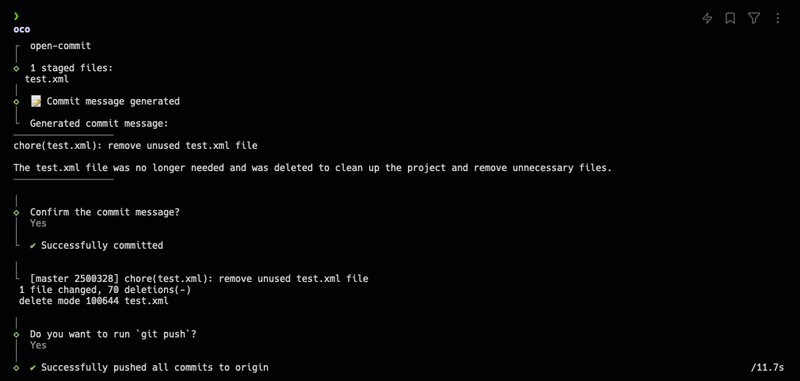
opencommit and aicommits automate the creation of commit messages, improving workflow efficiency and maintaining code consistency. The popularity and user-friendly interfaces of these tools make them a must-have for developers seeking to streamline their version control processes. Although
aicommits has slightly more stars on GitHub (i.e. over 7000),
opencommit has a well-polished TUI experience even though it only has roughly 5000 stars. Both of these tools offer the ability to install into your projects as Git commit hooks which allow you to leverage them by simply running
git commit. In order to use these tools, you have to define an OPENAI API key somewhere in your
~/.bashrc or
~/.zshrc setup.
5. Directory Navigation Redefined by
zoxide
Quick Folder Access: zoxide revolutionizes directory navigation by enabling quick access to frequently used folders with just parts of their names, drastically reducing the time spent navigating file systems. After including
zoxide initialization code into your
~/.bashrc or ~/.zshrc file, zoxide will remember folders you have been to and allow you to
cd to them by using partial paths / folder names. In other words,
cd ~/.local/share/chezmoi/home/dot_config becomes
z dot_config.
There are several other competeting packages like
autojump but
zoxide is written in Rust (i.e. it is fast) and it is very well-received by the community.
6. Scripting Made Easy with zx
JavaScript Meets Shell Scripting: ZX, a Google product, enhances shell scripting by allowing the incorporation of JavaScript/TypeScript alongside shell scripting commands, making scripts more readable and maintainable. It combines several useful packages for creating scripts (like NPM-based progress spinners and prompt packages) into an executable that can be invoked by running
zx myscript.js. It handles all this by allowing you to Promisify shell commands so they look more like this:
await $`echo "Heyyy yooo"`;Install Doctor utilizes ZX to handle the installation of software on multiple different platforms as well as handle the execution of package-dependent post-installation scripts. Check out the
installx executable in our GitHub repository to see how we handle installations on so many different operating systems.
7. WiFi Password Retrieval with
wifi-password
Instant Network Credentials: wifi-password is the go-to utility for quickly retrieving the password of the current WiFi network, proving itself as an essential tool for both personal and professional use. It is easy to remember. Just run
wifi-password and the password will be printed to your terminal.
8. Node.js Version Management by Volta
Consistent Development Environments: Volta provides a streamlined approach to managing Node.js versions, ensuring that development environments remain consistent across projects and teams by specifying versions in
package.json. By adding an initialization code to your
~/.bashrc or ~/.zshrc, Volta will automatically load the proper versions of Node.js, etc. whenever you enter into a directory.
9. Multi-Language Version Control with
mise
Flexible Dependency Management: mise (once known as
rtx) offers a versatile solution for managing versions of various programming languages, presenting a compelling alternative to other version management tools (like the current market leader
asdf) with its flexibility and Rust-based efficiency. The
mise website dives into detail on
why mise is better than
asdf on their website.
10. Command-Line AI Integration via sgpt
Enhance Productivity with AI: SGPT merges command-line functionality with AI, enabling creative and practical applications such as generating eCommerce product descriptions quickly and efficiently, showcasing the tool’s potential to revolutionize content creation processes.
Recently, I leveraged it to take a CSV dump of WordPress WooCommerce products and add both short and long descriptions for each product. This reduced what would have been a mind-blowingly long process of writing hundreds of product descriptions into something that only took a few minutes. Here’s the code I used to do this:
#!/usr/bin/env bash

cat csv.csv | while read LINE; do
    sleep 2
    SKU="$(echo "$LINE" | sed 's/,.*//')"
    NAME="$(echo "$LINE" | sed 's/.*,//' | tr "[A-Z]" "[a-z]" | sed -e "s/\b\(.\)/\u\1/g")"
    CHATGPT_GPT_PRE="$(echo "$NAME" | sgpt "Write an eCommerce product description. Assume description is used in a Mediterranean grocery product catalog that specializes in delivering high quality products at unbeatable prices. After it is generated, randomize the text.")"
    CHATGPT_GPT="$(echo "$CHATGPT_GPT_PRE" | sgpt "Re-write this eCommerce product description to encourage bulk purchases. Shorten it a little and use synonyms wherever it might improve the quality of the writing.")"
    CHATGPT_SHORT_GPT="$(echo "$NAME" | sgpt "Write a 20 - 40 word eCommerce product description assuming the description is for a Mediterranean grocery product catalog. Generate 10 responses and randomly return one of them.")"
    CHATGPT="$(echo "$CHATGPT_GPT" | tr -s ' ' | sed -E ':a;N;$!ba;s/\r{0,1}\n/\\n/g')"
    CHATGPT_SHORT="$(echo "$CHATGPT_SHORT_GPT" | tr -s ' ' | sed -E ':a;N;$!ba;s/\r{0,1}\n/\\n/g')"
    echo "\"$SKU\",\"$NAME\",\"$CHATGPT\",\"$CHATGPT_SHORT\"" >> chatgpt.descriptions14.txt
done
echo "All done!"
Note: Just like the ChatGPT auto-commit generators, this package requires you to specify an OpenAI API key as an environment variable.
11. Secure Connections with
cloudflared
Effortless and Secure Web Access:
cloudflared facilitates the secure connection of web services to the internet without complex configurations. Integrated into the Install Doctor system, it offers a streamlined, automated setup process, leveraging CloudFlare’s impressive free services to enhance accessibility and security.
Install Doctor has implemented a headless implementation of
cloudflared that completely automates the process of authenticating and integrating
cloudflared into the stack. You can see the implementation by searching for
cloudflared in the software.yml file. CloudFlare’s free service offering is wild - does anybody know how they offer all these amazing services for free and still turn a profit? Their stock has been going up last I checked.
While this list represents a selection of noteworthy command line utilities, it’s important to note that the command line ecosystem is vast and continually evolving. These tools, integrated into the Install Doctor provisioning system, exemplify the power and versatility of the command line interface in modern software development and system administration workflows. Whether you’re a seasoned developer or a newcomer to the command line, exploring these utilities can enhance your productivity and streamline your workflows on GitHub and beyond.
Install Doctor installs and configures all of these tools and more with a one-liner. Consider giving it a spin and joining our community of passionate technology enthusiasts.
Brian Zalewski
Call me BZ, the tech maestro of Megabyte Labs by day, gym enthusiast, party animal, and ball game champion by night. Always up for a quirky chat about AI, deities, or time-hopping. Plotting world betterment one inspiration at a time.